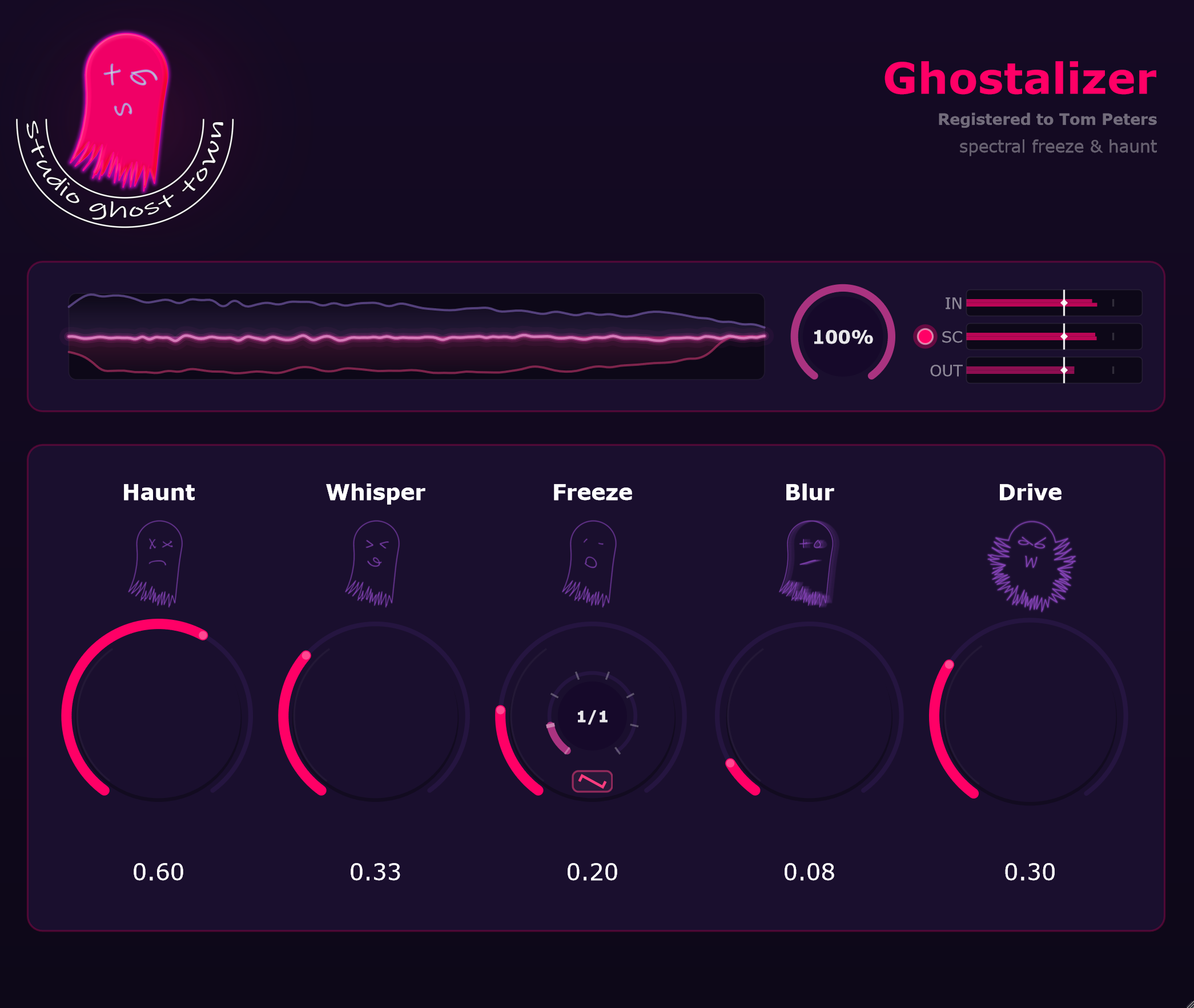
Ghostalizer continuously captures the spectrum of a ghost signal —
either the source itself or a separate sidechain feed, selected via SC.
Haunt then seamlessly blends the source with that captured ghost signal spectrum
in real time, at full spectral resolution.
Everything in this help refers to the source as the main signal being processed
(the track Ghostalizer is inserted on), and the ghost signal as the signal whose
spectrum is captured — which is the source itself when SC is set
to Input, or a separate sidechain track when set to Sidechain.
Quick Start
Load Ghostalizer on an insert slot of a track in your DAW.
Route another track into the Ghostalizer sidechain input — the SC indicator lights up solid instead of flashing.
Make sure that sidechained track is not also routed to your master / stereo out, or you’ll hear it twice.
Raise Haunt and haunt your sound! 👻
That’s all you need for your first ghostly sound. Explore Whisper, Freeze, Blur and Drive once you’re rolling — see the controls and sidechain guides below.
VST3 • CLAP • Windows & macOS (AU included on Mac). Full license from €0; support if it is useful.
Interface Controls
Control
What it does
Visualizer
Three overlaid spectrum lines that respond to the Dry/Wet setting — subtle and clean at 0%, full glowing spectra at 100%:
• Upper line — original source input spectrum
• Middle line — ghosted output (morphs between source and ghost signal)
• Lower line — ghost signal spectrum (sidechain when SC = Sidechain)
Dry/Wet
Global blend between dry and fully processed output. At 0% with sidechain active, Haunt fades the dry signal from the source to the sidechain — useful for clean sidechain crossfade without spectral processing. At 100% you hear the fully haunted output.
Input Gain
Pre-processing input level in dB.
SC Gain
Sidechain input level trim in dB. Visible when the ghost signal is set to Sidechain. The O button next to it toggles the sidechain on/off.
Output Gain
Post-processing output level in dB.
Haunt
Blends the source with the ghost signal’s spectrum. At zero: pure source. At full: pure ghost signal spectrum. This is the core morph control. Ghost icon dims when inactive.
Whisper
Transfers the ghost signal’s spectral envelope onto the fine structure of the source — a vocoder-like timbre transfer without fully replacing the source.
Freeze
Scrubs a one-bar ring buffer of the ghost signal’s spectral history. Freeze any past moment and animate it for evolving textures. The inner Wobble knob and LFO shape button become active when Freeze is engaged.
Wobble
Applies a tempo-synced LFO to the freeze position, creating a rhythmic wobble effect. Range: 1/1 – 1/64 bar. The small button below selects the LFO shape: Triangle (two-way), Saw forward, or Saw backward. Wobble knob and shape button are hidden when Freeze is off.
Blur
Smears the ghost signal’s spectrum across neighbouring bins for an atmospheric wash.
Drive
Saturates the ghost signal’s spectrum before blending, adding harmonic density.
Sidechain — Why It Matters
The most powerful mode: Source = Sidechain.
When a sidechain track is routed in and selected as the ghost signal, Ghostalizer continuously
captures its spectrum instead of the source’s own spectrum.
Haunt then blends the source with the ghost signal’s spectrum
in real time — at full spectral resolution. Classic examples: vocals morphing into a pad,
a drum loop transforming into texture, bass becoming a choir-like harmonic wash.
Important: after routing the sidechain, set that ghost signal channel output to
Off / None. do not route it to the master. Otherwise, you’ll hear doubled audio.
No sidechain signal = no ghost signal from sidechain. If Source is set to Sidechain but the DAW routing is not connected, the ghost signal will be silent and Haunt will have no effect.
SC Gain: if the sidechain ghost signal is quiet relative to the source, raise SC Gain before increasing Haunt and Whisper.
Source = Input (default): the source itself becomes the ghost signal. Ghostalizer captures its own spectrum. Useful for self-spectral freeze, Freeze scrubbing, and evolving textures without additional routing.
SC auto-detect: the plugin detects an active sidechain bus automatically and updates the SC indicator in the UI.
Sidechain Setup in Major DAWs
In every DAW: insert Ghostalizer on the target track (source) → route the ghost signal track to the sidechain input → set SC to Sidechain in the plugin → set the ghost signal track output to Off/None. do not route it to the master.
Ableton Live
Insert Ghostalizer (VST3) on the source track.
In the plugin device’s title bar, open the Sidechain input chooser and select the ghost signal track.
Set the ghost signal track’s Audio To output to Sends Only so it is not also heard on the master.
Set Source to Sidechain in the plugin and trim SC Gain.
Ghostalizer ships as VST3 and CLAP on Windows, and VST3, CLAP, and AU on macOS. AAX (Pro Tools) is not supported.
Frequently Asked Questions
Why does Haunt sound subtle, even at 100%?
Haunt blends the source with the ghost signal’s spectrum. If Source = Input and little time has passed, the ghost signal is effectively the source itself — both sides of the blend are nearly identical. Let audio play for a moment (spectral history builds automatically), or use Freeze to capture a specific past moment and then raise Haunt.
How do I morph one track’s timbre into another?
Route the desired ghost signal track (e.g. vocals) to Ghostalizer’s sidechain input, set Source to Sidechain, then raise Haunt. The source (e.g. a pad) takes on the spectral character of the ghost signal in real time. Add Whisper for deeper timbral transfer.
What does Freeze do, and how is it different from Haunt?
Freeze scrubs a one-bar ring buffer of the ghost signal’s spectral history, letting you freeze or animate any past moment. Haunt controls how much ghost signal vs. source you hear. They work together: Freeze picks which frame of the ghost signal, Haunt blends it into the source.
What does Wobble do?
When Freeze is active, Wobble applies a tempo-synced LFO to the freeze playback position, creating a rhythmic scanning effect. The range is 1/1 to 1/64 bar. The small LFO shape button below the Wobble knob switches between Triangle (symmetric two-way sweep), Saw forward, and Saw backward.
What does Dry/Wet do when set to 0%?
At 0% Dry/Wet you hear the unprocessed dry signal. If sidechain is active, Haunt still works on the dry side: it crossfades the dry signal from the source (Haunt=0) to the sidechain signal (Haunt=100%) without any spectral processing. This lets you use Ghostalizer purely as a clean sidechain crossfader.
What are Blur and Drive for?
Blur smears the ghost signal’s spectrum across neighbouring frequency bins, creating a cloud-like atmospheric wash. Drive saturates the ghost signal’s spectrum before Haunt blends it into the source, adding harmonic density and presence.
My export / bounce is silent in demo mode — why?
In unlicensed demo mode, offline render and export are intentionally blocked to prevent commercial use without a license. Real-time playback works normally. Install a valid license and re-export.
What demo restrictions apply after long use?
After approximately 60 minutes of cumulative real-time use, Ghostalizer introduces periodic brief gentle disturbances to encourage activation. Licensed users are not affected.
Can licenses have an expiry date?
Standard licenses are perpetual. Beta and evaluation licenses can include an expiry date embedded and signed in the license file. An expired key silently falls back to demo behavior.
How much latency does Ghostalizer add?
Ghostalizer uses a 2048-point FFT with 75% overlap, introducing approximately 1536 samples of processing latency. This value is reported to the host for automatic PDC (plugin delay compensation) alignment.
Troubleshooting
Problem
Likely cause
Fix
No sidechain effect despite Source = Sidechain
DAW routing not connected, or sidechain bus disabled.
Set up DAW routing, confirm the SC meter shows ghost signal activity. Raise SC Gain if the level is low.
Haunt does nothing
Source = Input and no ghost signal history yet; or Freeze at zero.
Let audio play to build ghost signal spectral history, or push Freeze to capture a frame, then raise Haunt.
Output is too quiet
Low Input Gain or SC Gain; Dry/Wet too low; Output Gain trimmed.
Raise Input Gain or SC Gain first, then adjust Output Gain last.
Harsh or unstable character
High Drive + high Haunt + hot input levels.
Lower the source level, reduce Drive, and add Blur to smooth the ghost signal’s spectrum.
Export / bounce is silent
Demo mode: offline render is blocked.
Activate a valid license and re-export.
License file rejected
Wrong product file, modified file, or expired time-limited key.
Use the original Ghostalizer .sgtlic and verify expiry date if applicable.